Previewing Corel Draw/Gallery Vector Clipart
This technical discussion is going to be WAY off topic from writing. So, if yacking about Corel Draw vector clipart is not your cup of tea, you may wish to skip this article, and I promise my next article will return to the fun topic of writing.
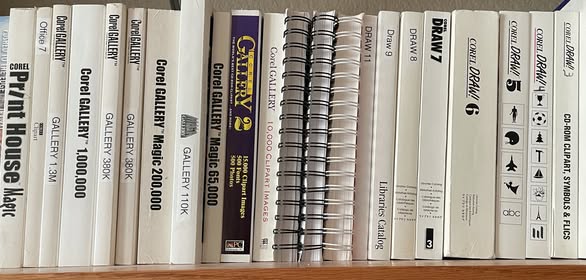
As you can see from the included photo, I have an obsession with Corel clipart. My problem is that Corel Draw does not have a clipart preview, so it is challenging to select the specific clipart from the endless files on my hard drive. In case you are interested, this is 3,375,454 vector images in 71,739 folders occupying 94.2GB. And I have all the clip art books I could find on eBay.
Well, not to worry because the Corel Gallery CDs have a built-in clipart preview tool. Yay? But the ancient program only runs on Windows XP. Boo! With some intensive compatibility work, I got it working in Windows 11. Yay? But I learned it is not technically a preview program. Instead, it uses pre-rendered 256-color images at low resolution and will only work if you have a specific CD in the drive, rather than previewing thumbnails from a directory. Plus, it was an awful program that did not allow searching. Boo!
Years ago, I found a program called ??? It was perfect because it rapidly previewed all the clipart thumbnails in a directory. Plus, it allowed for searches across multiple directories. Yay!
And I used it without issue for a long time. Double-yay!
Things were perfect until Windows installed a Windows Update preview. (Side note: I no longer allow Windows Update previews to be installed for some reason.) It bricked my machine, and I had to reinstall the OS and all the programs. Major-boo! Fortunately, I had all my files and data, so I did not lose any work or precious memories. Triple-yay! The problem was that I forgot the name of the preview program and could not reinstall it. So, I posted on all the Corel forums, and nobody knew what I was talking about. Fast forward two years of searching, and I rediscovered XNView MP.
As you can see from the included photo, I have an obsession with Corel clipart. My problem is that Corel Draw does not have a clipart preview, so it is challenging to select the specific clipart from the endless files on my hard drive. In case you are interested, this is 3,375,454 vector images in 71,739 folders occupying 94.2GB. And I have all the clip art books I could find on eBay.
Well, not to worry because the Corel Gallery CDs have a built-in clipart preview tool. Yay? But the ancient program only runs on Windows XP. Boo! With some intensive compatibility work, I got it working in Windows 11. Yay? But I learned it is not technically a preview program. Instead, it uses pre-rendered 256-color images at low resolution and will only work if you have a specific CD in the drive, rather than previewing thumbnails from a directory. Plus, it was an awful program that did not allow searching. Boo!
Years ago, I found a program called ??? It was perfect because it rapidly previewed all the clipart thumbnails in a directory. Plus, it allowed for searches across multiple directories. Yay!
And I used it without issue for a long time. Double-yay!
Things were perfect until Windows installed a Windows Update preview. (Side note: I no longer allow Windows Update previews to be installed for some reason.) It bricked my machine, and I had to reinstall the OS and all the programs. Major-boo! Fortunately, I had all my files and data, so I did not lose any work or precious memories. Triple-yay! The problem was that I forgot the name of the preview program and could not reinstall it. So, I posted on all the Corel forums, and nobody knew what I was talking about. Fast forward two years of searching, and I rediscovered XNView MP.
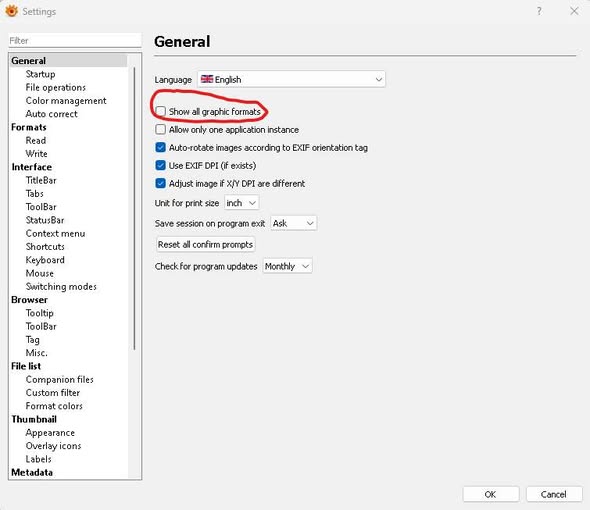
The free program claimed to do just what I remembered, but when I installed it, it did not preview any Corel vector files. Boo! After extensive searching, I learned that I had to go to tools>settings>general and click “show all graphics formats” then restart. Why on earth would this not be the default? And why do you have to restart? This program is available for Win32/Win64/Mac OS/Linux. Yay!
I included a screenshot of the setting that must be done, the directories showing previews, and the thumbnails in the directory.
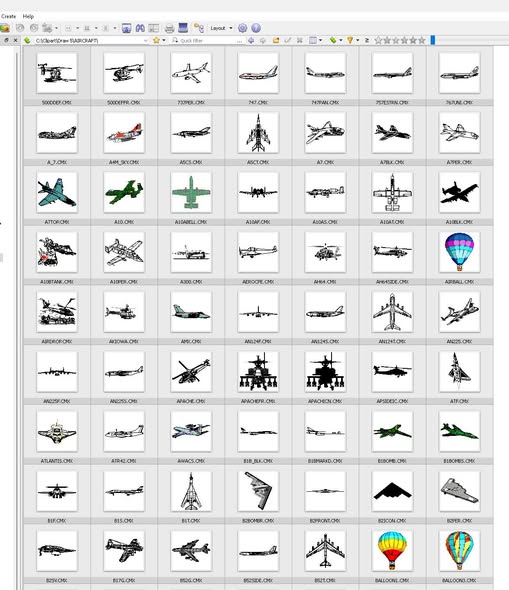
There are two issues. The program is not exactly showing a preview; instead, it shows a low-resolution thumbnail embedded in the clipart file, and you cannot click the file in XNView to view it full-size. (To use the file, you must go into Corel Draw and import it.) But it does exactly what I need, and it is an excellent image preview program. Note that GhostScript must be installed to view .eps files. Strange. XnSoft asks for a voluntary registration fee of 29 pounds (money), which I gladly paid.
Now, you might be thinking, there is a better solution:
I included a screenshot of the setting that must be done, the directories showing previews, and the thumbnails in the directory.
There are two issues. The program is not exactly showing a preview; instead, it shows a low-resolution thumbnail embedded in the clipart file, and you cannot click the file in XNView to view it full-size. (To use the file, you must go into Corel Draw and import it.) But it does exactly what I need, and it is an excellent image preview program. Note that GhostScript must be installed to view .eps files. Strange. XnSoft asks for a voluntary registration fee of 29 pounds (money), which I gladly paid.
Now, you might be thinking, there is a better solution:
It is only $5, but it does not display the thumbnails quickly or visually acceptable. XNView is far superior/free.
Would you like a massive vector clipart collection of your own? Go to the Internet Archive under software. You can perform two searches: “corel draw” and “corel gallery” then you will see many disk images and can download/extract them to your local directory.
Would you like a massive vector clipart collection of your own? Go to the Internet Archive under software. You can perform two searches: “corel draw” and “corel gallery” then you will see many disk images and can download/extract them to your local directory.
Alternatively, you can do the same eBay search and get the books/CDs. I recommend Corel Gallery 1 million (most images) and Corel Draw 6 (best art book). They go for around $60. So far, I have spent $300+ on my obsession and have the following books/CD’s: Corel Draw 3-X4, (except 10), Gallery (10K, 65K, 200K, 300K, 750K, 1M, 1.3M), Masterclips 125M, Office 7, Print house Magic, Swift Clipart, Art Explosion 600K and Art Explosion 800K. Yeah, I have a problem.
However, you will encounter a major issue. For some reason, some of the gallery/draw clipart uses the .CCX or .WI file extension on the CDs. The workaround is to use the free Bulk Extension Changer program (or a similar program) to change the extension to .CMX, then you can read them perfectly
However, you will encounter a major issue. For some reason, some of the gallery/draw clipart uses the .CCX or .WI file extension on the CDs. The workaround is to use the free Bulk Extension Changer program (or a similar program) to change the extension to .CMX, then you can read them perfectly
Since you have read this far. Want to have some fun? If you have downloaded the CDs from the Internet Archive or purchased the disks on eBay, you will find a bunch of fair-use .jpg clip art. Pick one, go to Tineye, and do a reverse image search. Wow, look at where all these images ended up. So many crazy things from the 90s are still hanging around, and so many mainstream sites still use Corel clipart. (Side note: No, I am not joking. I had a lot of fun doing this.)
Does anybody know if they ever printed a dedicated clipart book for Corel Gallery 2 Million, Corel Draw 10, Corel Draw X5, or Corel Draw X6? The CDs have clipart, but I never found a book on eBay or any other site. I did find old sites that sold these products, and none mentioned a clipart book. I could not find out anything about Corel Gallery 2 Million. I still have my eye out.
PS, did I mention that I also have a font obsession? It turns out that the Corel font manager program is fantastic at previewing, searching, and loading fonts. Very cool. And I know you want to know how big my collection is. Only 428,231 fonts, in 914 folders, occupying 26.7GB. Got to work on that.
You’re the best -Bill
January 07, 2026
PS, did I mention that I also have a font obsession? It turns out that the Corel font manager program is fantastic at previewing, searching, and loading fonts. Very cool. And I know you want to know how big my collection is. Only 428,231 fonts, in 914 folders, occupying 26.7GB. Got to work on that.
You’re the best -Bill
January 07, 2026


